


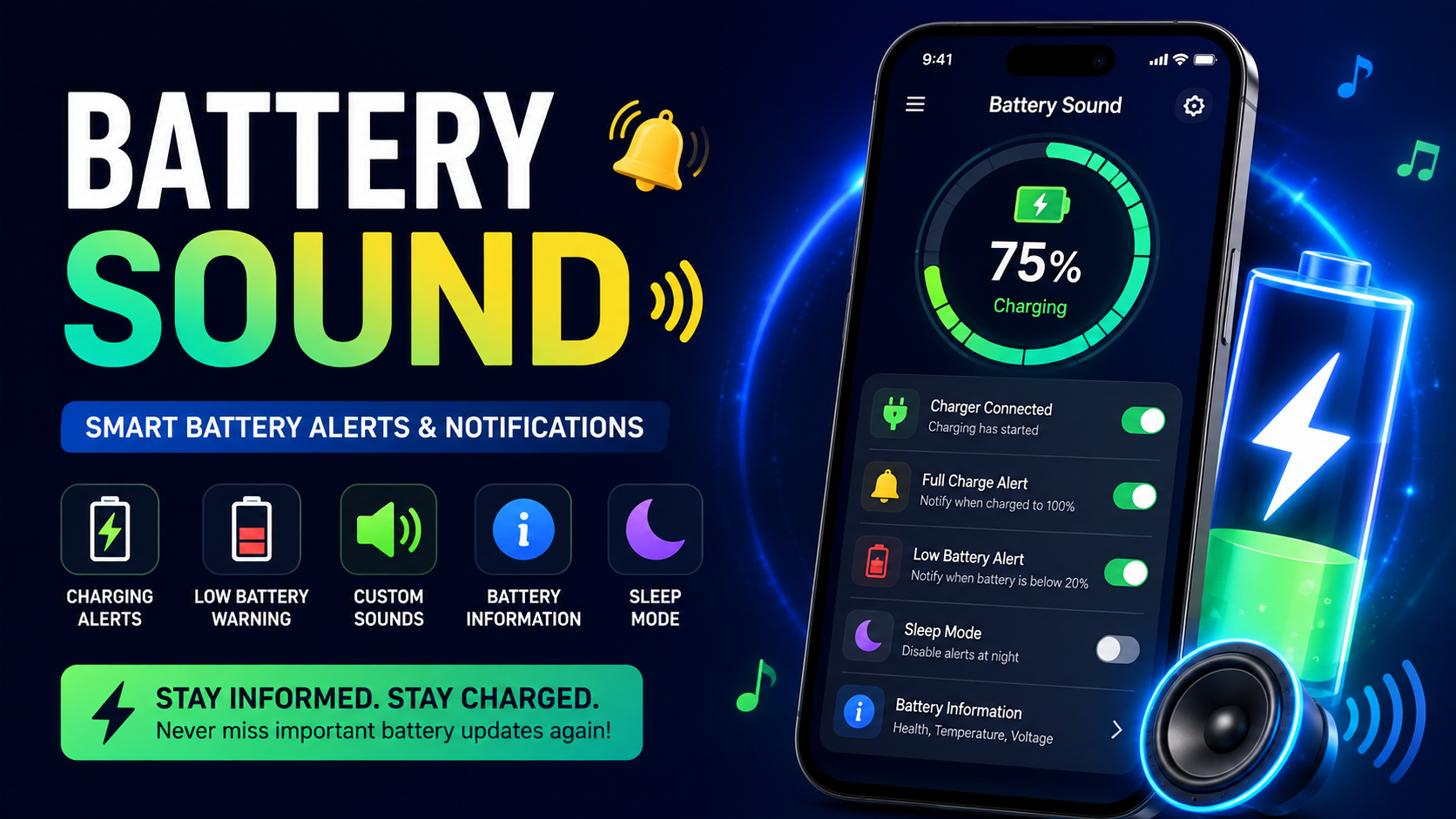
Battery Sound is a useful battery notification and charging alert solution designed to help smartphone users stay aware of their device’s battery condition. Instead of repeatedly checking the battery percentage, users can receive sounds, notifications, and alerts when important charging events happen.
Modern smartphones are used throughout the day for communication, entertainment, work, education, navigation, photography, and many other activities. Because of this, keeping an eye on battery level has become an important part of everyday phone use. A phone that suddenly reaches a low battery level can become inconvenient, especially when you are away from a charger.
This is where Battery Sound can make battery monitoring easier. The app is designed around simple alerts that notify you when a charger is connected, when charging stops, or when the battery reaches a selected level. It can also provide useful battery information such as battery health, capacity, voltage, temperature, and charging or discharging activity.
The main idea behind Battery Sound is simple: instead of constantly looking at your phone, you can allow battery alerts to tell you when something important happens.
Whether you want a full-charge alarm, a low-battery warning, a charging notification, or a more noticeable charging experience, this type of battery utility can make everyday phone management more convenient.
What Is Battery Sound?
Battery Sound is a battery monitoring and notification app designed to provide alerts about your smartphone’s charging status and battery level.
The application focuses on giving users useful information through notifications and customizable alert sounds. When a charging event occurs, the app can notify the user so they know what is happening without having to continuously open the battery settings.
For example, you may connect your charger before going to sleep. Instead of checking the phone repeatedly, a full-charge alert can notify you when the selected battery level has been reached.
Similarly, if your battery becomes low while you are busy, a low-battery alarm can remind you that your phone needs attention.
The app also provides information related to battery condition and charging activity, making it more than a simple alarm. It can serve as a convenient battery assistant for users who want better awareness of their device’s power status.
Why Use Battery Sound?
Battery management is important because smartphone users depend heavily on their devices. Losing battery unexpectedly can interrupt important activities.
Battery Sound provides a convenient way to stay informed without constantly checking the screen.
Some of the main reasons users may want to use a battery alert application include:
- Receiving charging notifications
- Knowing when the charger is connected
- Knowing when the charger is disconnected
- Getting low-battery warnings
- Receiving high-battery or full-charge alerts
- Using customized sounds
- Monitoring battery information
- Checking charging and discharging activity
- Managing alert periods with sleep mode
- Making charging more noticeable with charging animations
These features can make daily battery management simpler and more organized.
Battery Sound Key Features
1. Charger Plug-In Alerts
One of the useful features of Battery Sound is the charger plug-in notification.
When you connect your phone to a charger, the app can provide an alert indicating that charging has started. This can be helpful when your phone is positioned somewhere that makes it difficult to see the screen.
A charging-start alert provides immediate confirmation that the device has recognized the charging connection.
This can be particularly useful when you connect your phone quickly and continue with another activity.
2. Charger Plug-Out Alerts
Charging does not always continue as expected. A cable can become loose, a connection can be interrupted, or the charger may accidentally become disconnected.
A charger plug-out alert can notify you when charging stops because the charger has been disconnected.
This provides an additional layer of awareness and can help users notice charging interruptions sooner.
Instead of discovering much later that the phone has not been charging, an alert can bring the event to your attention immediately.
3. Low Battery Alarm
A low-battery warning is one of the most practical functions of a battery notification app.
With Battery Sound, users can configure battery-level alerts to remind them when the battery reaches a selected low percentage.
For example, a user may want an alert when the battery becomes low enough that charging should begin.
A low-battery alarm can be especially useful for people who become busy and forget to check their battery percentage throughout the day.
Rather than waiting until the phone is almost completely discharged, an earlier warning gives you time to find a charger.
4. High Battery and Full Charge Alerts
Another important feature is the ability to receive an alert when the battery reaches a selected high level.
A full-charge alarm can be useful for users who want to know when charging has reached their preferred level.
You can use the alert as a reminder to check the phone and disconnect the charger when appropriate.
The exact behavior of charging and battery management can vary between devices, so users should always follow their phone manufacturer’s charging recommendations.
5. Custom Battery Alert Sounds
A major reason to use Battery Sound is the ability to customize how battery alerts are delivered.
Different users have different preferences. Some people may prefer a simple ringtone, while others may want a voice notification or another audio file.
Depending on the available settings, users can choose from options such as:
- Audio files
- Ringtones
- Text-to-speech notifications
- Battery alert sounds
Custom sounds can make important notifications easier to recognize.
For example, you could choose one sound for a low-battery warning and another sound for a full-charge notification.
This makes battery alerts more recognizable without requiring you to look at your phone every time.
Battery Sound for Battery Information
Battery monitoring is not only about percentage.
Your smartphone battery has several important characteristics, including capacity, voltage, temperature, and charging status.
Battery Sound can provide access to useful battery information so users can better understand what is happening with their device.
Battery Health
Battery health can provide an indication of the battery’s condition.
Over time, rechargeable batteries naturally experience changes in their capacity and performance. Monitoring available battery information can help users understand their device better.
However, battery health measurements can vary depending on the device, operating system, and available system information.
Battery Capacity
Battery capacity describes how much energy the battery is designed to store.
Knowing the approximate capacity of a device can help users understand why some phones last longer than others.
A larger capacity does not automatically guarantee longer battery life because actual usage also depends on factors such as screen brightness, applications, network activity, and system settings.
Battery Voltage
Battery voltage is another technical measurement that can be displayed by battery monitoring tools.
Most everyday users do not need to constantly monitor voltage, but the information can be useful for people who want to understand more about their device’s battery behavior.
Having multiple battery measurements in one place can make the app more informative than a simple battery percentage indicator.
Battery Temperature
Battery temperature can also be useful information.
Smartphones can become warmer during charging or intensive use. Temperature readings can help users become more aware of the device’s current condition.
If a phone becomes unusually hot, users should investigate the situation and follow appropriate device safety guidance instead of relying only on an app notification.
Battery Charge and Discharge Monitoring
Another useful part of Battery Sound is charge and discharge monitoring.
Battery usage changes continuously depending on what the phone is doing.
For example, watching videos, playing games, using navigation, recording videos, or running demanding applications can consume more power than simple messaging or reading.
Charge and discharge information can help users understand these changes.
By paying attention to battery behavior, you can learn which activities consume the most power and make better decisions about your daily phone usage.
Battery Sound Sleep Mode
Not every battery alert is needed at every moment.
If you receive battery sounds during sleeping hours, the notifications may become unnecessary or disruptive.
The sleep mode feature allows users to disable battery alert services during selected periods.
This is particularly useful for people who want battery monitoring during the day but do not want repeated alert sounds while sleeping.
A scheduled quiet period can create a more comfortable experience without requiring users to completely disable the battery alert functionality.
Charging Animation Feature
Battery Sound can also enhance the charging experience through charging animations.
Charging animations can appear when the phone is connected to a charger, creating a more visual and interactive charging experience.
Instead of seeing only the standard charging indicator, users can enjoy a dedicated charging animation on the lock screen or home screen, depending on the device and available app behavior.
This feature is mainly focused on visual customization and user experience.
For users who enjoy personalized phone interfaces, charging animations can make a routine activity feel more engaging.
How Battery Sound Works
The basic idea behind Battery Sound is straightforward.
The application monitors battery-related events and responds when a configured condition occurs.
A typical process can look like this:
Step 1: Open the App
Start by opening Battery Sound on your smartphone.
Step 2: Configure Notifications
Choose which battery events you want to monitor.
These may include charging, disconnection, low battery, or high battery levels.
Step 3: Select an Alert
Choose the type of notification or sound you want to use.
Step 4: Set Battery Levels
If the app provides customizable thresholds, select the battery percentage at which you want to receive an alert.
Step 5: Configure Quiet Hours
If available, use sleep mode to prevent unnecessary alerts during selected periods.
Step 6: Connect the Charger
Connect your phone to the charger and allow the battery monitoring service to detect the charging event.
Step 7: Receive Alerts
When a configured condition is reached, the app can provide the selected notification or sound.
This setup makes battery monitoring largely automatic.
Benefits of Battery Sound
There are several practical benefits of using Battery Sound.
Better Battery Awareness
The biggest advantage is improved awareness.
Instead of manually checking battery percentage repeatedly, you can rely on configured alerts.
Convenient Charging Notifications
Charging notifications can confirm when charging starts and stops.
Customizable Experience
Different alert types allow you to personalize the experience according to your preferences.
Useful Battery Information
Battery details can help you understand your phone’s current power condition.
Less Manual Checking
Automatic alerts reduce the need to repeatedly open the battery settings.
Flexible Alert Management
Sleep mode and configurable battery thresholds can help users control when alerts appear.
Battery Sound for Everyday Phone Users
You do not need to be a technical user to benefit from a battery alert application.
A normal smartphone user can use Battery Sound simply as a reminder system.
Imagine that you are preparing to leave home. Your phone has a low battery, but you are busy getting ready. Instead of remembering to check the percentage every few minutes, you can use a battery alert to tell you when charging reaches your preferred level.
Similarly, if you charge your phone overnight or during work, an appropriate notification can help you stay aware of charging events.
The goal is convenience.
Battery Sound for Busy Users
People who spend long periods working on computers, studying, driving, traveling, or managing other tasks may not regularly check their phones.
Battery alerts can provide a simple reminder system.
For busy users, the most useful functions may include:
- Low battery warnings
- Charging-start alerts
- Charging-stop alerts
- High battery notifications
- Custom sounds
- Battery information
These features can reduce the possibility of overlooking important battery events.
How to Get the Best Experience
To get the best experience from Battery Sound, configure only the alerts that are genuinely useful to you.
Too many notifications can become distracting.
A simple setup might include:
- Enable a low-battery warning.
- Enable a high-battery or full-charge alert.
- Enable charger connection notifications.
- Enable charger disconnection notifications.
- Select sounds that are easy to recognize.
- Configure sleep mode if you do not want nighttime alerts.
- Review battery information when necessary.
This approach keeps the app useful without creating unnecessary interruptions.
Battery Sound and Charging Habits
A battery alert application can help create more consistent charging habits.
Instead of charging randomly and forgetting about the phone, users can become more aware of battery levels.
For example, you might establish a routine where you charge the phone when the battery reaches your preferred low threshold and check it again when the high threshold is reached.
Good charging habits should always be based on the recommendations for your particular smartphone and battery technology.
The app is best viewed as an awareness and notification tool rather than a replacement for the device manufacturer’s battery guidance.
Common Battery Sound Settings
The exact options available can depend on the device and application version, but common battery alert settings may include:
Battery Level
Choose the percentage at which an alert should activate.
Alert Sound
Select a preferred sound for the notification.
Voice Alert
Use text-to-speech when supported.
Charger Connection
Receive a notification when charging starts.
Charger Disconnection
Receive a notification when charging stops.
Sleep Mode
Disable alerts during selected periods.
Charging Animation
Customize the visual charging experience when supported.
Battery Sound Troubleshooting
Sometimes a battery notification may not behave exactly as expected.
If you are not receiving an alert, check the app’s notification and sound settings first.
Check Notification Permissions
Make sure the application has permission to display notifications.
Check Sound Volume
If the notification appears but you cannot hear it, check your phone’s media and notification volume.
Check Battery Restrictions
Some phones restrict background applications to save power. Review your device’s battery or background activity settings if notifications stop unexpectedly.
Check Alert Thresholds
Make sure the selected battery percentage is appropriate for the alert you are testing.
Check Sleep Mode
If alerts are missing during a particular period, check whether sleep mode or another quiet setting is active.
Restart the App
If a feature does not respond correctly, closing and reopening the application may help refresh its service.
Is Battery Sound Easy to Use?
Yes, the main concept is simple.
The app is designed around battery events and notifications rather than complicated technical controls.
Users can select the alerts they need and allow the application to notify them when those conditions occur.
The most important thing is to configure the app according to your personal routine.
Someone who wants only a full-charge reminder can keep the setup simple. Another user may prefer multiple alerts, battery information, charging notifications, and customized sounds.
Battery Sound for a More Convenient Charging Routine
Charging your smartphone is a routine activity, but it is easy to forget about it.
You might connect the charger while working, studying, watching something, or preparing for sleep. Without a reminder, you may not notice when the battery reaches your selected level.
Battery Sound can make this process more noticeable.
With configurable sounds and notifications, the app can turn battery events into clear reminders.
This does not mean users should ignore their phone’s built-in battery management features. Instead, the application can work as an additional convenience layer for users who prefer audible or customized battery notifications.
FAQs
What is Battery Sound?
Battery Sound is a battery monitoring and alert application designed to notify users about charging events, battery levels, and other battery-related information.
Can Battery Sound notify me when charging starts?
Yes, charger plug-in alerts are one of the key functions described for the application.
Can I receive a full battery alert?
The application supports high-level battery alarms, allowing users to receive an alert when the battery reaches a selected high level.
Can I customize the battery alarm sound?
The app provides different alert options, including audio files, ringtones, and text-to-speech notifications, depending on available device functionality.
Does Battery Sound show battery information?
Yes. The application is designed to provide information such as battery health, capacity, voltage, and temperature.
Can Battery Sound monitor charging and discharging?
Yes. The application includes charge and discharge monitoring features to help users understand battery activity.
Does Battery Sound have a sleep mode?
The app’s described features include a sleep mode that can disable battery alert services during selected periods.
Does Battery Sound provide charging animations?
Yes, the application includes a charging animation feature intended to enhance the visual charging experience.
Is Battery Sound useful for everyday users?
Yes. Its main purpose is to make battery monitoring and charging notifications more convenient.
Final Thoughts on Battery Sound
Battery Sound is designed to make smartphone battery monitoring simpler through sounds, notifications, battery information, and charging-related alerts.
Its features focus on common battery situations that smartphone users experience every day. Charger connection alerts can confirm that charging has started, while disconnection notifications can help users notice when charging stops. Low and high battery alarms can provide reminders at selected battery levels.
The ability to choose different alert sounds adds personalization, while battery information such as capacity, voltage, temperature, and health can provide additional insight into the device.
The charge and discharge meter can also help users understand battery activity, while sleep mode gives users greater control over when notifications are active. Charging animations add a visual element for people who enjoy customizing their charging experience.
Overall, Battery Sound is best understood as a practical battery notification and monitoring tool. It can reduce the need to repeatedly check the battery percentage and make important charging events easier to notice.
If you frequently forget to charge your phone, miss charging interruptions, or simply want more control over battery notifications, Battery Sound can provide a convenient way to stay informed.
The best setup is usually a simple one: choose the alerts that matter to you, select recognizable sounds, configure appropriate battery levels, and use quiet periods when necessary. With the right settings, battery monitoring becomes less of a manual task and more of an automatic part of your daily smartphone routine.



