


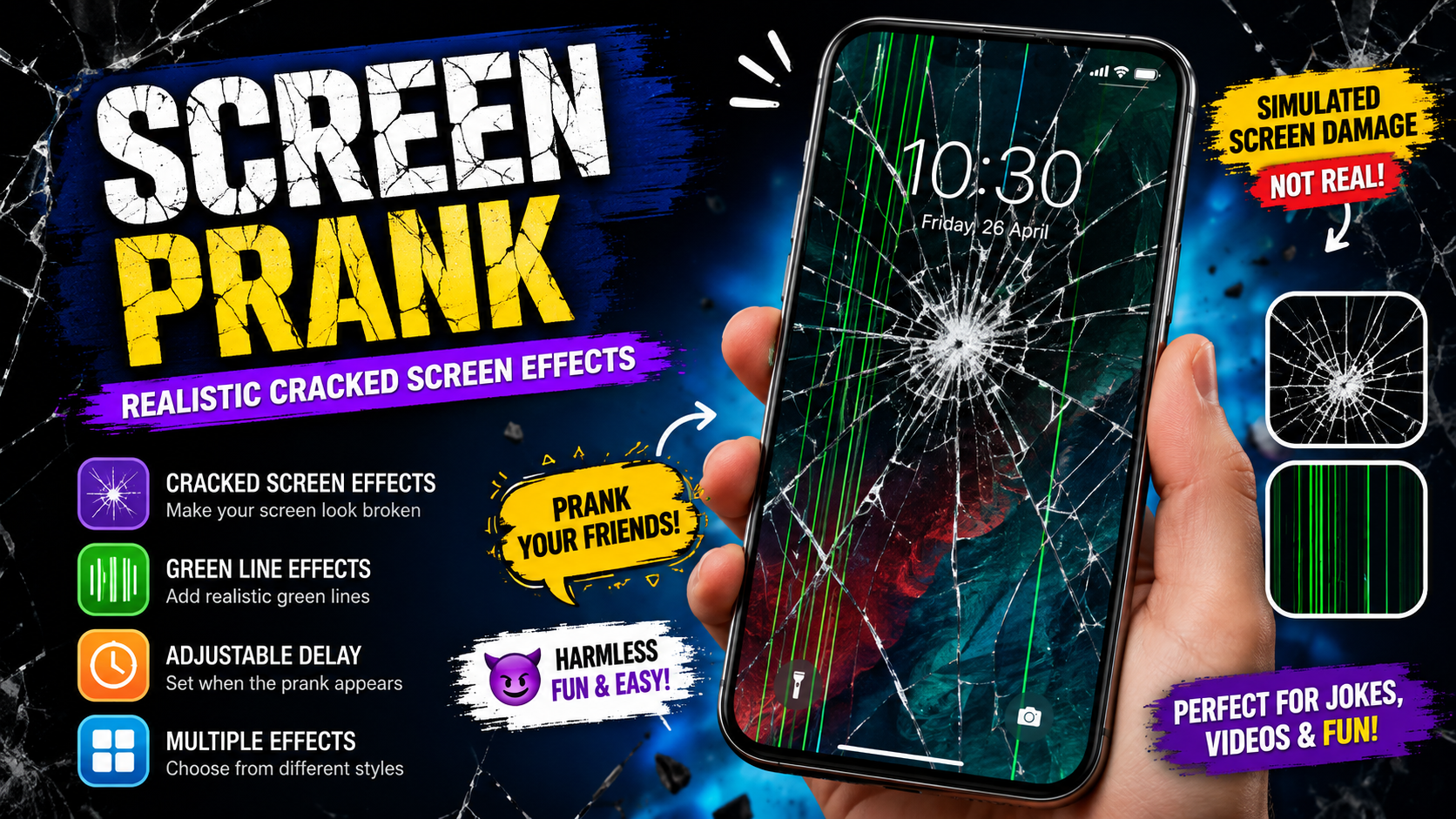
Looking for a fun way to surprise your friends and family? Screen Prank is an entertaining simulation app designed to create realistic-looking screen damage effects without actually damaging your phone. Instead of physically breaking a display, the app creates visual effects that can make your screen appear cracked, damaged, covered with lines, or affected by unusual screen obstacles.
A Screen Prank can be a simple way to add humor to everyday moments. You can prepare a fake damaged-screen effect, show it to a friend, and enjoy their reaction before revealing that everything is only a simulation. The main idea is simple: make the phone display look damaged while keeping the real device completely safe.
The original Screen Prank page describes the app as a simulation tool that can imitate cracked-screen effects and display green lines or other visual obstacles in different areas of the screen. It also highlights customizable effects and delay settings, allowing users to control when the prank appears.
In this guide, we will explain what Screen Prank is, how it works, its main features, how to use it responsibly, and why simulated screen effects can make a simple joke more entertaining.
What Is Screen Prank?
Screen Prank is an entertainment application that simulates the appearance of a damaged smartphone screen. The effect is visual rather than physical. Your actual display remains intact while the application creates an image or animation that makes the screen appear to have problems.
The concept is especially useful for harmless jokes. For example, you can make your phone appear to have strange green lines across the display. You can also use screen obstacles or simulated cracks to create a more convincing effect.
The important point is that the application does not physically break or damage the screen. The effect is created through software and displayed on the phone.
This makes Screen Prank different from a real broken display. A genuine damaged screen can have physical cracks, touch problems, dead pixels, discoloration, or other hardware issues. A prank simulation only creates an appearance of damage.
How Does Screen Prank Work?
The basic idea behind Screen Prank is straightforward. The application places a visual effect over the normal phone display. Depending on the selected effect, the screen may appear to contain cracks, lines, tiles, or other damage-like patterns.
You can choose an effect and configure when it should appear. The existing app description specifically mentions the ability to decide when green lines or obstacles appear and adjust delay settings.
A typical experience can work like this:
- Open Screen Prank.
- Select a screen damage effect.
- Adjust the available settings.
- Choose a delay if the feature is available.
- Prepare your phone for the prank.
- Let the simulated effect appear.
- Show the screen to your friend.
- Reveal the prank after a short moment.
The effect is intended for entertainment, so it is best used in situations where everyone can laugh about it afterward.
Main Features of Screen Prank
1. Simulated Cracked Screen Effects
One of the main attractions of Screen Prank is the ability to simulate a damaged display. A realistic-looking screen effect can make someone briefly believe that something happened to the phone.
The simulation can be useful when you want to create a quick surprise without causing real damage.
2. Green Line Effects
Green lines are another visual effect associated with the app. The original description mentions green lines appearing on different areas of the display.
This can be particularly convincing because display problems sometimes involve lines appearing across a screen. A simulated line effect can therefore create a believable but harmless visual joke.
3. Adjustable Delay
Timing can make a prank more effective. The app description mentions delay settings, giving users a way to control when the screen effect appears.
For example, you may want the phone to look normal initially and then display the effect after a short delay. This can make the prank less obvious.
4. Different Screen Areas
The effects can appear in different areas of the display. The original page notes that visual effects can occur in areas such as the boundaries, top, bottom, and other parts of the screen.
This flexibility can help create different prank scenarios.
5. Simple User Experience
A good prank application should not require complicated technical knowledge. Screen Prank is designed around a straightforward entertainment concept: select an effect, configure it, and display the result.
That makes it suitable for users who simply want a quick visual joke.
6. Harmless Visual Simulation
The most important feature is that the damage is simulated. Your phone is not physically broken just because a cracked-screen effect appears.
The original page clearly states that the phone will not actually be damaged by the simulated effect.
Why Use Screen Prank?
There are many reasons people enjoy prank applications. They can turn ordinary moments into funny experiences and provide a quick form of entertainment.
A Screen Prank can be useful when:
- You want to surprise a friend.
- You want to create a funny reaction.
- You enjoy harmless practical jokes.
- You want a simulated cracked-screen effect.
- You want to experiment with visual effects.
- You need a simple entertainment app.
- You want to make a short prank video.
- You want to demonstrate what a damaged display might look like without damaging a real phone.
The key is to keep the prank short, harmless, and appropriate for the person involved.
Screen Prank for Friends
Friends are often the easiest audience for a harmless screen prank. You can prepare a simulated damage effect and briefly show the phone as if something has gone wrong.
For example, imagine your friend asks to use your phone. You hand it over, and after a short delay, a fake screen effect appears. They may initially think the display has developed a problem.
After a few seconds, you can reveal that it is only a prank.
The best reactions usually happen when the person understands that no real damage occurred.
Screen Prank for Family
A Screen Prank can also be used with family members, but it is important to consider their personality. Some people may find a fake broken phone funny, while others may immediately become worried.
For this reason, avoid using the prank in situations where someone could become seriously stressed.
The purpose should always be entertainment rather than causing fear.
How to Use Screen Prank
Using a screen simulation app is generally simple. While the exact controls may vary depending on the application version and device, the basic process can be understood in a few steps.
Step 1: Open the App
Launch Screen Prank on your Android device and explore the available effects.
Step 2: Choose an Effect
Select the screen effect you want to use. Depending on the available options, this may include simulated cracks, lines, obstacles, or other damage-style visuals.
Step 3: Adjust the Settings
If customization options are available, adjust the appearance and timing of the effect. The original page specifically mentions selecting a screen damage style and adjusting delay settings.
Step 4: Prepare the Prank
Think about how you want the prank to happen. A little planning can make the effect more convincing.
Step 5: Display the Effect
Start the simulation and let the selected effect appear on the screen.
Step 6: Reveal the Joke
Do not keep someone worried for too long. Reveal the prank and explain that the screen effect was simulated.
Tips for a Better Screen Prank
A successful prank is not necessarily the most complicated one. Often, simple timing and good judgment make the biggest difference.
Keep the Prank Short
Do not allow someone to believe their phone is permanently damaged for an extended period. A short surprise is usually enough.
Choose the Right Person
Know your audience. Use a screen prank with someone who enjoys jokes and understands that the purpose is entertainment.
Use Good Timing
If the effect has a delay option, use it carefully. A delayed effect can make the prank feel more natural because the screen may look normal at first.
Do Not Cause Panic
Avoid using a fake damage effect when someone depends on their phone for an urgent task or is already stressed.
Reveal the Truth
Once you have achieved the reaction you wanted, reveal that the effect is simulated. The goal should be laughter, not prolonged worry.
Is Screen Prank Safe for Your Phone?
A simulated screen effect does not physically crack the glass or damage the display. The original Screen Prank description specifically explains that the visual damage is not actual physical damage.
However, users should still understand that an application can display effects on the screen without changing the physical condition of the device.
If your phone already has a damaged display, do not assume a visual prank effect will repair or protect it. Screen Prank is designed for entertainment rather than hardware repair.
Screen Prank vs. a Real Broken Screen
It is important to understand the difference between simulated and physical damage.
A real broken screen can involve:
- Cracked glass
- Touchscreen problems
- Dead areas
- Flickering
- Black spots
- Display discoloration
- Lines caused by hardware damage
- Reduced visibility
A Screen Prank only imitates the appearance of such problems through visual software effects.
This distinction is important because a prank application cannot repair actual hardware damage. It is simply a way to create a temporary visual simulation.
Can Screen Prank Really Break Your Screen?
No. The purpose of the application is to simulate screen damage rather than physically break your display.
A visual cracked-screen effect does not mean that your glass has been shattered. Similarly, simulated green lines are not the same as permanent hardware-related display lines.
The original app page emphasizes that the phone will not actually be damaged by the prank effect.
Can Screen Prank Be Used for Videos?
Yes, simulated screen effects can be useful for creating short entertainment videos. A fake damaged display can add a funny moment to a prank clip or social video.
For example, you could create a short scenario where a friend believes the screen has suddenly developed a problem.
If you record someone for a prank video, make sure they are comfortable with the recording and with sharing it afterward. A joke becomes more enjoyable when everyone involved is comfortable.
Benefits of Using a Screen Prank App
Entertainment
The primary benefit is simple entertainment. The application provides an easy way to create a visual joke.
No Physical Screen Damage
Because the effect is simulated, you do not need to physically damage a phone to create the appearance of a broken display.
Easy to Experiment With
Different visual styles can create different reactions. Users can experiment with timing and screen placement.
Quick Setup
The concept is simple enough for a short prank without complicated preparation.
Creative Possibilities
The effects can also be used creatively in videos, demonstrations, jokes, and other forms of entertainment.
Things to Consider Before Using Screen Prank
Even harmless apps should be used responsibly. A prank can be funny to one person and stressful to another.
Before starting a Screen Prank, consider the following:
- Is the person comfortable with jokes?
- Could the prank cause unnecessary stress?
- Is the phone important for work or an emergency?
- Are you recording the reaction?
- Will the video be shared?
- Can you reveal the prank quickly?
These simple questions can help keep the experience positive.
Common Screen Prank Problems and Solutions
Sometimes an effect may not appear exactly as expected. The problem may be caused by device settings, app compatibility, permissions, or software behavior.
Effect Does Not Appear
First, close and reopen the application. Make sure the selected effect has been activated correctly.
Delay Does Not Work
Check the timing settings and make sure the feature has been configured correctly. Some Android devices may handle overlays and background behavior differently.
Effect Looks Different
Screen sizes, resolutions, display technologies, and Android versions can affect how visual effects appear. An effect may therefore look slightly different on different devices.
App Stops Unexpectedly
Restart the app and check whether your phone has sufficient available memory. Keeping the device software updated can also help with general application stability.
Overlay or Display Permission Issues
Some applications that display effects over other content may require specific permissions. Only grant permissions that you understand and that are appropriate for the application’s intended function.
Is Screen Prank a Real Screen Repair Tool?
No. Screen Prank should not be confused with a screen repair application.
It does not fix:
- Broken glass
- Touchscreen damage
- Dead pixels
- Hardware lines
- Display flickering
- Water damage
- Internal display problems
Its purpose is entertainment and visual simulation.
If a phone has genuine physical damage, it should be handled as a hardware issue rather than relying on a prank application.
Screen Prank for Entertainment
The popularity of prank concepts comes from their simplicity. You do not always need expensive equipment or complicated editing software to create a funny moment.
A simulated screen effect can turn an ordinary interaction into a quick surprise.
The best part is that the effect can be removed or stopped without physically changing the phone.
This makes Screen Prank an interesting option for people who enjoy harmless visual tricks and practical jokes.
Privacy and Responsible App Use
Whenever you install an application, it is good practice to review the permissions it requests. Only provide permissions that make sense for the application’s features.
Users should also download applications from trustworthy sources and keep their Android device updated.
Avoid installing modified application files from unknown sources simply because they claim to provide extra features. An unofficial file can carry risks that have nothing to do with the original prank concept.
A responsible approach helps ensure that your entertainment does not create unnecessary security problems.
FAQs
What is Screen Prank?
Screen Prank is an entertainment application that simulates damaged or cracked screen effects. It is designed to make a phone display appear damaged without physically damaging the device.
Does Screen Prank actually break the phone?
No. The screen damage is a visual simulation. The original app description states that the phone will not actually be damaged by the effect.
Can I create fake green lines on my screen?
The Screen Prank description includes green-line effects among its simulated visual effects.
Can I control when the prank appears?
The original description mentions delay settings, allowing users to control when certain effects appear.
Is Screen Prank useful for videos?
Yes. A simulated damaged display can be used as a visual element in prank and entertainment videos, provided that people being recorded are treated respectfully.
Does Screen Prank repair a damaged phone?
No. It is an entertainment application and does not repair physical display problems.
Is a simulated cracked screen the same as a real crack?
No. A simulated crack is displayed through software, while a real crack involves physical damage to the screen.
Can I use Screen Prank with friends?
Yes. It is intended for entertainment and can be used for harmless jokes with friends who enjoy this type of prank.
Final Thoughts
Screen Prank provides a simple and entertaining way to create the appearance of a damaged smartphone display without physically damaging the device. Its main appeal comes from simulated screen effects, green lines, obstacles, customizable styles, and timing options.
The concept is easy to understand: instead of breaking a phone, you use software to make the screen look broken for a short time. This makes it possible to create a funny surprise without putting the actual hardware at risk.
The original Screen Prank page highlights simulated cracked-screen visuals, green lines, adjustable effects, and delay settings, while also emphasizing that the phone itself is not actually damaged.
For the best experience, keep your pranks short and friendly. Choose people who enjoy jokes, avoid situations where the prank could cause serious concern, and always reveal the truth afterward.
If you enjoy harmless practical jokes and want a quick way to create a realistic-looking damaged-screen effect, Screen Prank can be an entertaining option to explore



