


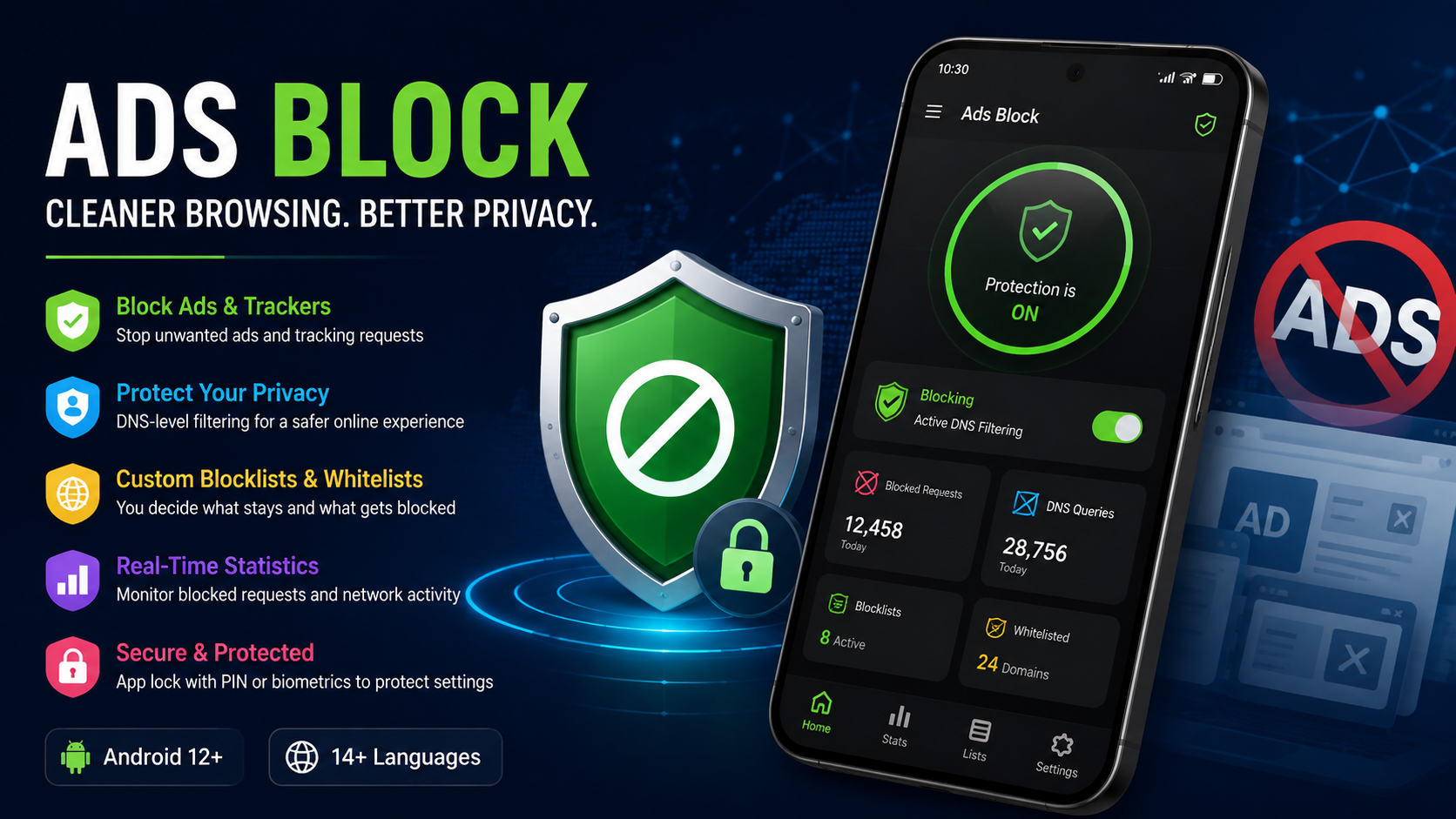
Ads Block is a useful solution for Android users who want more control over the websites, advertisements, trackers, and online requests their devices interact with. Instead of depending only on individual browser settings, Ads Block can work through DNS-based filtering to manage unwanted requests before they reach your device. This approach can make everyday browsing cleaner, more private, and easier to manage.
For many Android users, online advertisements are only part of the problem. Websites and applications can also generate requests for tracking services, analytics systems, promotional content, and other domains that users may not always want to access. A DNS-based Ads Block solution gives users a central way to manage these requests.
The idea is simple: when your Android device tries to connect to a domain, the DNS service determines where that request should go. If a domain appears on a selected blocklist, the request can be filtered instead of being allowed normally. This can help reduce unwanted content while giving users greater control over their digital environment.
This complete Ads Block guide explains how DNS-based blocking works, what features users can expect, how to configure filtering, why privacy matters, and how to get the most from an Android DNS management application.
What Is Ads Block?
Ads Block refers to technology designed to prevent unwanted advertisements and related online requests from loading on your device. One practical approach is DNS-based filtering, where domain requests are checked against filtering rules before connections are completed.
A DNS manager can provide a convenient interface for controlling these settings. Rather than manually editing complicated network configurations, users can manage filtering options through an Android application.
The main purpose of Ads Block is to give users greater control over their internet experience. Depending on the configuration, filtering can help reduce advertising domains, unwanted trackers, known harmful requests, and other categories included in a selected filtering list.
This can be particularly useful for people who frequently browse websites, use mobile applications, or connect their Android device to different networks.
How Does Ads Block Work?
Understanding how Ads Block works makes it easier to understand why DNS filtering can be useful.
DNS stands for Domain Name System. It is responsible for translating human-readable domain names into the information devices need to connect to online services.
For example, when you enter a website address, your device needs to determine where that domain is located. DNS performs this lookup.
A DNS filtering system adds a layer of control to this process.
When your device requests a domain, the DNS filtering service can compare the request against configured rules. If the requested domain is permitted, the connection can continue. If the domain matches a blocking rule, the request can be filtered.
This creates a centralized method of controlling unwanted requests.
With Ads Block, users can therefore manage filtering without having to configure every website individually.
Why Use Ads Block on Android?
Android devices are used for browsing, communication, entertainment, shopping, education, and many other activities. As a result, they frequently communicate with online services.
A dedicated Ads Block solution can make it easier to control some of these connections.
1. Cleaner Browsing
One of the biggest reasons users choose Ads Block is to reduce unwanted advertising and promotional content.
When advertising domains are filtered, some websites may appear cleaner because certain external requests are prevented from loading.
A cleaner browsing experience can make it easier to focus on the content you actually want to read or watch.
2. Better Privacy Control
Privacy is another important reason to consider DNS filtering.
Some websites and applications communicate with analytics or tracking-related domains. Depending on the filtering configuration, users may be able to block selected tracking requests.
Ads Block can therefore become part of a broader privacy strategy.
However, DNS filtering should not be considered complete privacy protection by itself. Users should still follow good security practices, use strong passwords, keep software updated, and carefully review application permissions.
3. Centralized Filtering
Without a centralized system, users may need to configure filtering separately in different applications.
DNS-based Ads Block can provide a more centralized approach.
Instead of changing settings repeatedly, users can configure their DNS filtering preferences and apply those rules at the network-request level.
4. Control Over Blocklists
Blocklists are an important part of DNS filtering.
A blocklist contains domains or rules that should be filtered. Depending on the service and configuration, users can select different filtering categories.
This gives users more control than simply switching a generic ad-blocking feature on or off.
5. Whitelist Support
Blocking everything is not always a good idea.
Some websites or applications may stop working correctly when certain domains are blocked. A whitelist can help solve this problem.
A whitelist allows users to identify domains that should remain accessible even when broader filtering rules are enabled.
This creates a balance between filtering and compatibility.
Key Ads Block Features
A good Ads Block application should make DNS management understandable even for users who are not networking experts.
The current page describes an Android DNS management application with several useful features, including filtering configuration, blocklists, whitelists, statistics, security controls, multiple-language support, and protected settings.
User-Friendly Interface
Managing DNS settings can sound complicated, especially for beginners.
A user-friendly interface makes the process easier by presenting important options in an organized way.
Instead of dealing with complicated configuration files, users can manage settings through the application.
A straightforward interface is particularly important when users need to make quick changes to filtering rules.
Dark Mode
Dark mode can make applications more comfortable to use in low-light environments.
It can also provide a familiar appearance for users who prefer dark interfaces across their Android devices.
Although dark mode does not directly improve DNS filtering, it contributes to a more comfortable overall application experience.
Dynamic or Themed Icons
Modern Android applications can integrate with device themes through dynamic or themed icons.
This allows the application to feel more integrated with the user’s Android interface.
Multiple Language Support
Language support can make an application more accessible to a wider audience.
The current Ads Block page states that the described DNS manager supports 14 languages.
This is useful for users who prefer managing technical settings in a language they understand comfortably.
Blocklists and Ads Block
Blocklists are one of the most important components of DNS-based filtering.
A blocklist identifies domains that should be prevented or filtered according to specific rules.
For example, a filtering list may contain domains associated with advertising, tracking, or other unwanted requests.
When a device attempts to contact a domain included in the active filtering rules, the DNS filtering system can prevent that request from resolving normally.
The effectiveness of Ads Block therefore depends heavily on the quality and configuration of the filtering rules.
Users should avoid enabling every possible list without considering compatibility. Excessive filtering can sometimes cause websites or applications to behave unexpectedly.
A balanced configuration is often better than simply activating the maximum number of filters.
Whitelists and Why They Matter
A whitelist provides an important safety valve for DNS filtering.
Imagine that you visit a website that you trust, but one of its required domains happens to appear on a filtering list. The website may fail to load completely.
Instead of disabling all Ads Block protection, you can add the necessary domain to your whitelist if you trust it.
This gives you more precise control.
The basic idea is:
Block what you do not want, allow what you need.
That approach makes DNS filtering more practical for everyday use.
Real-Time Statistics
Another useful feature described on the current page is real-time statistics.
Statistics can help users understand what their DNS filtering system is doing.
Depending on the application, users may be able to view information such as:
- DNS queries
- Blocked requests
- Security-related events
- Filtering activity
- Network request patterns
These statistics can make an otherwise invisible process easier to understand.
Without statistics, users may know that filtering is enabled but have little idea about how often it is actually being used.
With statistics, users can observe activity and make better decisions about their configuration.
Ads Block and Online Privacy
Online privacy has become increasingly important as people spend more time connected to the internet.
Everyday browsing can involve many different types of network requests. Some are necessary for websites and applications to work, while others may be related to advertising, analytics, or tracking.
DNS filtering can help users manage some of these requests.
However, it is important to understand the limitations.
Ads Block does not automatically make every online activity private. DNS filtering is only one part of a larger privacy strategy.
Users should also:
- Keep Android updated
- Install applications from trustworthy sources
- Review application permissions
- Use strong and unique passwords
- Enable account security features
- Avoid suspicious links
- Be careful when using public Wi-Fi
- Review privacy settings regularly
Using Ads Block together with these habits can provide a stronger overall approach to digital privacy.
Ads Block for a Safer Browsing Experience
Security and privacy are closely connected, but they are not exactly the same.
A DNS filtering system can help prevent connections to domains included in security-related filtering rules.
The current page describes the DNS service as offering filtering designed to protect online activity and mentions security events as part of its statistics.
This can help users understand potentially unwanted network activity.
Still, no filtering system should be treated as a guarantee that every website or file is safe.
Users should continue to think carefully before downloading files, entering passwords, or providing personal information online.
How to Configure Ads Block on Android
Setting up a DNS-based Ads Block solution generally involves several stages.
Step 1: Install the Application
Begin by installing the appropriate DNS management application on your Android device.
Before installation, make sure the application is compatible with your Android version.
The current page describes the app as compatible with Android 12 and later.
Step 2: Open the DNS Settings
After launching the application, review the available DNS configuration options.
The exact layout can vary depending on the application version.
Take some time to understand what each setting does before changing advanced options.
Step 3: Configure Filtering
Enable the filtering features you want to use.
This may include advertising filters, privacy-related filtering, security lists, or other available categories.
Start with a reasonable configuration rather than activating every available option immediately.
Step 4: Manage Blocklists
Review your available blocklists and select the lists that match your needs.
If you mainly want to reduce advertisements, focus on relevant advertising filters.
If privacy is your main concern, consider appropriate privacy-oriented filtering rules.
Step 5: Configure the Whitelist
If an important website or application stops working, check whether a filtering rule is responsible.
If you trust the required domain, you can consider adding it to the whitelist.
Step 6: Monitor Statistics
Use available statistics to see how the system is performing.
Monitoring blocked requests can help you understand whether your configuration is working as expected.
Step 7: Protect Your Settings
The current page also describes an app-lock feature using biometrics or a PIN code.
This can help prevent unauthorized users from changing your DNS configuration.
Ads Block App Lock
A DNS configuration can affect how a device connects to online services, so protecting the settings can be useful.
If another person regularly uses your phone, they may accidentally or intentionally change filtering settings.
An application lock can add an additional layer of control.
According to the current page, the described application supports protection using biometrics or a PIN code.
Users should choose a secure PIN and avoid sharing it unnecessarily.
Benefits of Ads Block
There are several potential advantages to using DNS-based Ads Block technology.
Improved Web Experience
Filtering unwanted domains can reduce some forms of advertising and unnecessary requests.
Centralized Management
DNS settings can be managed from a single location instead of being configured separately in every application.
Privacy-Focused Filtering
Users can select filtering rules intended to reduce certain tracking-related requests.
Greater Control
Blocklists and whitelists allow users to customize what should be blocked and what should remain accessible.
Activity Visibility
Statistics can show users how many requests are being processed or blocked.
Protected Configuration
PIN or biometric protection can help prevent unwanted changes to DNS settings.
Possible Limitations of Ads Block
Although Ads Block can be useful, it is not perfect.
Some websites depend on domains that may also be used for advertising or tracking. Blocking those domains can sometimes affect website functionality.
Users may experience:
- Missing website elements
- Login problems
- Broken media
- Applications that fail to load correctly
- Delayed connections
- Unexpected content issues
When this happens, users should review their filtering rules instead of immediately assuming that the application is broken.
The whitelist can be useful when a trusted domain needs to be allowed.
Another limitation is that DNS filtering cannot control every form of online content. It works primarily at the domain/request level and should not be confused with a complete device security system.
Ads Block vs. Traditional Browser Filtering
Browser-based filtering and DNS-based Ads Block work at different levels.
Browser filtering typically focuses on requests made through a particular browser.
DNS filtering can operate at a broader level because DNS requests can originate from different applications on the device.
This can make DNS filtering useful for users who want centralized control.
However, the exact behavior depends on Android configuration and the DNS solution being used.
For users who primarily browse through one browser, browser-based controls may be sufficient. For users who want broader device-level DNS management, Ads Block can be a more suitable approach.
How to Improve Ads Block Performance
Getting the best experience from Ads Block is not simply about blocking as much as possible.
A better strategy is to create a balanced configuration.
Use Relevant Filters
Only enable filtering categories that match your goals.
Review Problems
If a website stops working, investigate the filtering rules before disabling everything.
Use the Whitelist Carefully
Whitelist only domains you trust and genuinely need.
Monitor Statistics
Statistics can help you understand how your configuration affects network activity.
Keep the Application Updated
Application updates can improve compatibility, stability, and security.
Review Your Settings Regularly
Your browsing habits may change over time. Review your configuration periodically and remove unnecessary rules.
Ads Block for Everyday Android Users
You do not need to be a networking expert to benefit from DNS filtering.
For a normal Android user, the most important goal is simple: create an internet experience that feels cleaner, more controlled, and easier to manage.
A basic configuration can be enough.
You can start with a suitable filtering list, monitor the results, and add trusted domains to the whitelist when necessary.
Over time, you can learn more about DNS settings and customize the configuration according to your needs.
Is Ads Block Easy to Use?
A DNS manager can sound technical, but a well-designed Android application can make the process much easier.
The current page emphasizes an intuitive interface and centralized DNS configuration management.
This is important because complicated settings can discourage users from making useful privacy and security improvements.
A simple interface allows users to focus on what they actually want to achieve rather than worrying about complicated networking terminology.
Is Ads Block Good for Privacy?
Ads Block can contribute to better privacy by filtering selected domains associated with advertising or tracking.
However, it should be considered one component of a broader privacy strategy.
Good privacy practices include limiting unnecessary permissions, keeping software updated, using secure passwords, and avoiding suspicious websites.
DNS filtering can complement these habits by providing another layer of control over network requests.
Does Ads Block Block Every Advertisement?
No filtering system should be expected to block every advertisement.
Ads can be delivered in different ways, and some content may come from domains that are also necessary for a website or application.
The effectiveness of DNS-based Ads Block depends on the filtering rules, the websites being visited, and how advertising content is delivered.
The goal is not necessarily to remove every visual advertisement but to provide users with greater control over unwanted network requests.
Does Ads Block Affect Internet Speed?
DNS filtering may have little noticeable effect for many users, but performance can depend on the DNS provider, network quality, device configuration, and filtering setup.
A well-configured system can work in the background without requiring constant user interaction.
If you notice connection problems after enabling filtering, check your configuration and filtering lists.
Ads Block Troubleshooting Guide
If Ads Block does not appear to work correctly, try the following steps.
Check Your Internet Connection
First make sure your device has a stable internet connection.
Review DNS Configuration
Incorrect DNS settings can prevent filtering from operating correctly.
Check Active Filters
A filtering rule may be blocking a domain required by a website or application.
Review the Whitelist
If a trusted service is not working, consider whether a necessary domain needs to be allowed.
Restart the Application
Closing and reopening the application can sometimes help resolve temporary issues.
Restart the Device
A device restart can refresh network-related settings.
Update the Application
Make sure you are using a current compatible version.
Review Security Settings
If the application includes an app lock, verify that the authentication settings are working correctly.
Ads Block and Responsible Internet Use
Technology can help users manage their online environment, but responsible internet use remains important.
Users should not rely on Ads Block as their only security measure.
Always verify websites before entering sensitive information. Avoid downloading unknown files and be cautious about suspicious messages or links.
A filtering system can reduce certain unwanted requests, but good digital habits remain essential.
FAQs
What is Ads Block?
Ads Block is a method of filtering unwanted advertising and related network requests. DNS-based filtering can manage these requests at the DNS level.
Is Ads Block available for Android?
Yes. The page discussed here describes an Android DNS management application designed for Android devices and states compatibility with Android 12 and later.
Can Ads Block improve privacy?
Ads Block can help reduce certain tracking and advertising-related requests when appropriate filtering rules are enabled. It should still be used as one part of a broader privacy strategy.
Can I create a whitelist?
The described DNS management application supports whitelist management, allowing users to permit selected domains when filtering rules would otherwise block them.
Can I see blocked requests?
The current page describes real-time statistics for DNS queries, blocked requests, and security events.
Does Ads Block require technical knowledge?
Basic use does not necessarily require advanced networking knowledge, particularly when the application provides an intuitive interface. More advanced DNS configurations may require additional understanding.
Can Ads Block break websites?
Filtering can sometimes interfere with websites or applications when an essential domain is blocked. Reviewing filters and using a trusted whitelist can help resolve compatibility issues.
Is Ads Block a complete security solution?
No. DNS filtering is only one layer of protection. Users should still update their devices, use strong passwords, review permissions, and avoid suspicious online activity.
Final Thoughts
Ads Block can be a practical option for Android users who want greater control over DNS requests, advertising-related domains, tracking requests, and other unwanted connections.
The biggest advantage of DNS-based filtering is centralized control. Instead of relying entirely on individual applications, users can manage filtering rules at the DNS level.
Features such as blocklists, whitelists, real-time statistics, language support, and protected settings can make DNS management easier for everyday users. The current page specifically highlights these capabilities as part of its Android DNS management experience.
The best approach is to start with a simple configuration, monitor how it affects your device, and make adjustments when necessary. Avoid overly aggressive filtering if it causes important websites or applications to stop working.
For users who care about a cleaner browsing experience and greater control over online requests, Ads Block can be a useful addition to an Android privacy and security setup.
Remember that no single application can guarantee complete privacy or security. Ads Block works best when combined with responsible browsing habits, regular software updates, secure passwords, careful application permissions, and general awareness of online threats.
With the right configuration, DNS filtering can become a quiet background tool that gives Android users more control over how their devices interact with the internet.



