


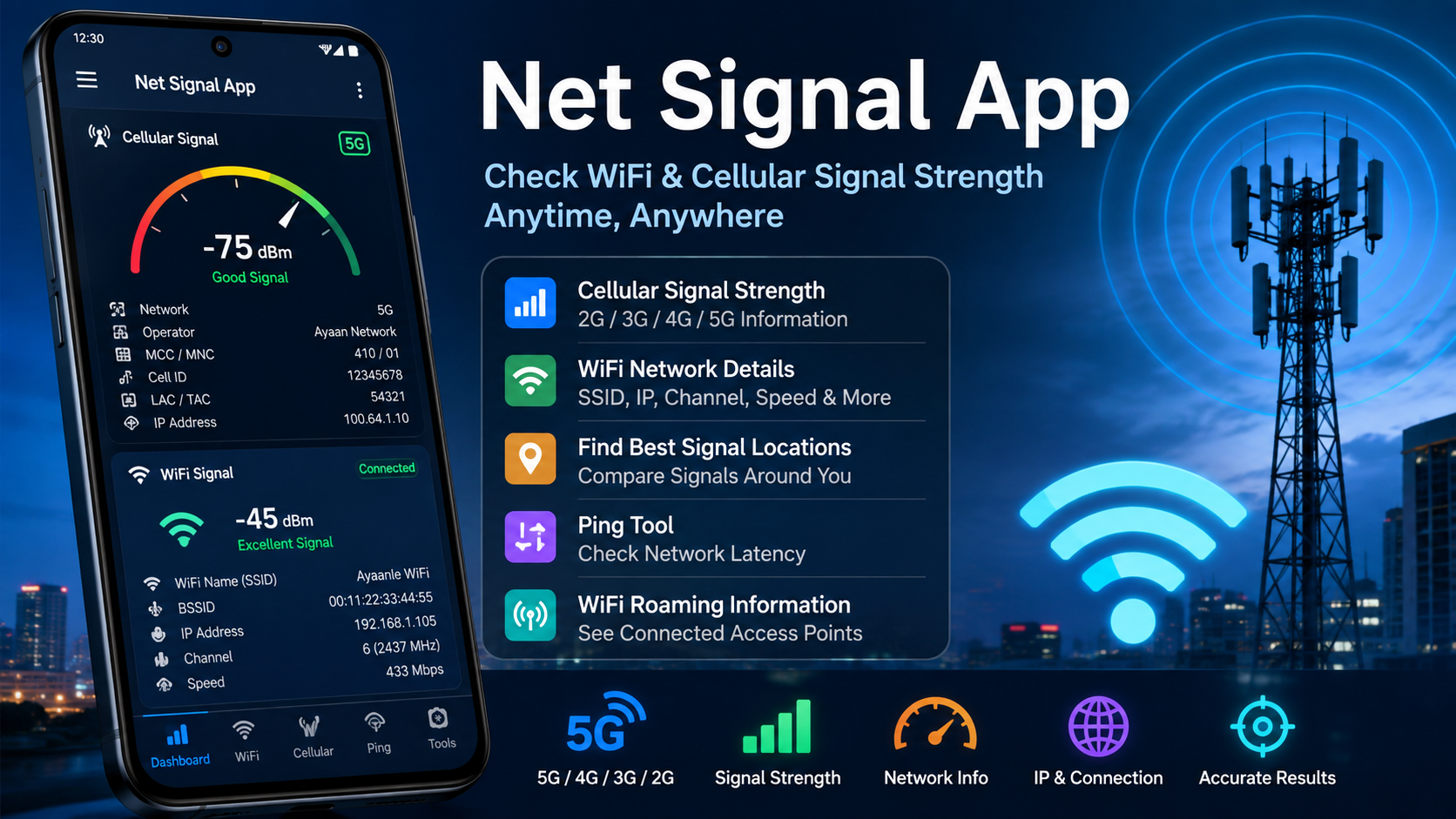
Net Signal App is a useful Android tool for people who want to understand the quality of their WiFi and mobile network connection. Instead of relying only on the small signal icon shown at the top of your phone, the Net Signal App provides more detailed information about your connection and helps you identify areas where the signal is stronger or weaker.
A strong and stable network connection is important for browsing the internet, watching videos, making online calls, using social applications, downloading files, playing online games, and connecting smart devices. Sometimes your phone may show a good signal while the internet still feels slow. In other situations, the signal may become weak when you move to another room or location. This is where a detailed signal monitoring tool can be helpful.
The Net Signal App is designed to provide information about both cellular and WiFi connections. You can use it to check network strength, view connection information, identify WiFi details, examine cellular network information, and test network response with a ping tool.
This guide explains what the Net Signal App does, its main features, how it can be useful, how to understand signal information, and how to get better results when checking your connection.
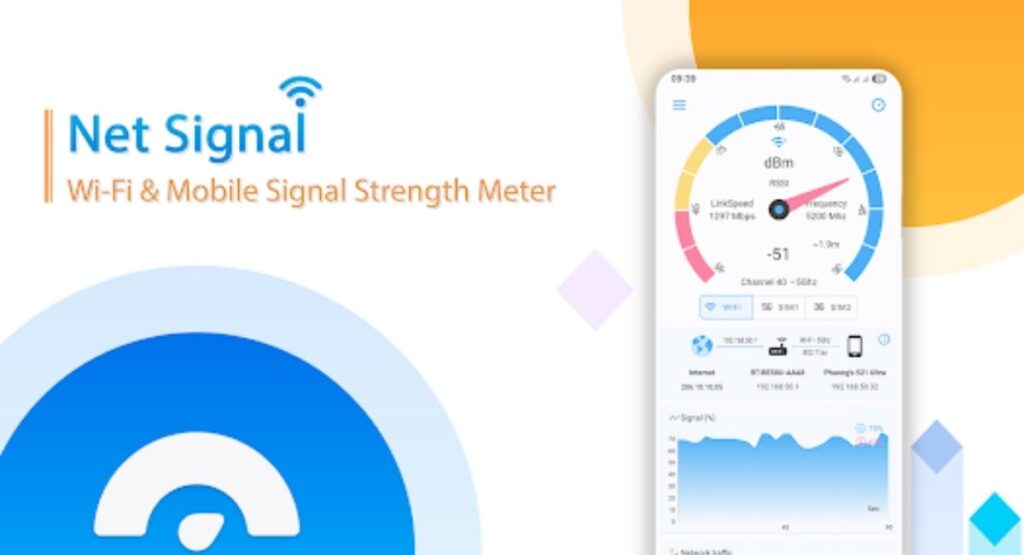
What Is Net Signal App?
The Net Signal App is a network monitoring and signal-strength application for Android devices. Its main purpose is to help users view information about their WiFi and cellular network connections.
Many phones provide only a basic signal indicator. The standard signal bars can tell you whether the connection is generally weak or strong, but they do not always provide enough technical information for users who want to understand their network more closely.
The Net Signal App gives you access to additional network information. Depending on your device and network configuration, you can view cellular network type, operator information, signal strength, IP information, WiFi connection details, and other technical data.
The app can also continuously update signal information while you move around. This makes it useful when you want to find a better location for your phone, router-connected device, smart home equipment, or other wireless equipment.
Why Use Net Signal App?
There are many situations where knowing your actual network condition can be useful.
For example, imagine that your WiFi works perfectly in one room but becomes unreliable in another room. You could simply guess where the problem is, or you could walk around while monitoring the signal and find the areas where the connection is stronger.
The same idea applies to cellular networks. If mobile reception changes depending on where you stand, the Net Signal App can help you observe those changes.
The application is particularly useful for:
- Checking WiFi signal strength
- Checking cellular signal strength
- Understanding 2G, 3G, 4G, and 5G connections
- Viewing network information
- Checking WiFi connection details
- Monitoring signal changes while moving
- Checking network latency with ping
- Finding better locations for wireless devices
- Troubleshooting inconsistent connectivity
- Learning more about your phone’s network connection
The original Ayaanle.Tech listing describes the app as a tool for checking WiFi and cellular signal strength and finding better connectivity locations around a home, workplace, or other connected area.
Main Features of Net Signal App
The Net Signal App includes several useful features for monitoring wireless connectivity. Let’s look at the main features in detail.
1. Cellular Signal Information
One of the most useful functions is cellular network monitoring.
The app can display information about your mobile connection and help you understand what type of cellular network your phone is currently using.
Depending on your device and network, the information may include:
- Cellular network type
- Mobile network operator
- SIM operator
- Phone type
- Network type
- Signal strength
- Signal measurement in dBm
- IP address
- Connection information
This information can be useful when you are experiencing inconsistent mobile internet or calling performance.
2. WiFi Signal Information
The Net Signal App can also provide detailed information about your WiFi connection.
WiFi information may include details such as:
- WiFi network name
- SSID
- BSSID
- Maximum WiFi speed
- IP address
- Public IP information
- Network capability
- WiFi channel
- Subnet mask
- Gateway
- DHCP server
- DNS information
These details can be especially helpful for users who want to understand how their phone is connected to a wireless network.
3. WiFi Signal Strength Monitoring
A major benefit of the Net Signal App is the ability to monitor WiFi signal strength while moving around.
Your WiFi connection does not necessarily have the same quality everywhere in your home. Walls, floors, furniture, distance from the router, interference, and other environmental factors can affect wireless connectivity.
By watching the signal information while moving from one location to another, you can compare different areas.
For example, you can check:
- Near the router
- In another room
- Upstairs
- Downstairs
- Near a window
- Behind walls
- Near a smart device
This can help you understand where your WiFi connection performs best.
4. Cellular Signal Strength
The Net Signal App also monitors cellular signal strength.
Signal strength is often represented using technical measurements such as dBm. Although this information may look complicated at first, it can provide a more detailed picture than simply looking at signal bars.
Signal bars are useful for everyday users, but they can sometimes hide small differences in connection quality.
A signal measurement gives you more technical information and can help you compare different locations.
5. 2G, 3G, 4G, and 5G Information
Modern mobile networks can use different generations of cellular technology.
The Net Signal App can provide information related to cellular network generations, including 2G, 3G, 4G, and 5G, depending on the phone and network.
This is useful if you want to know which type of mobile connection your device is currently using.
For example, you may notice that your phone switches between different network types depending on location. Monitoring the network can help you understand why your mobile experience changes.
6. Ping Tool
Another useful feature is the built-in ping tool.
Ping is commonly used to measure how quickly a network responds to a request. This is generally associated with latency.
A connection can have reasonable download performance but still feel slow in situations that require quick responses if latency is high.
The ping tool can therefore provide another way to examine network behavior.
It can be useful when troubleshooting:
- Slow responses
- Online gaming problems
- Delayed connections
- Network instability
- General connectivity issues
7. WiFi Roaming Information
The app also provides WiFi roaming-related information.
This can help users identify which WiFi access point their device is using and observe connection changes while moving through an area.
This feature can be particularly useful in places where multiple wireless access points are available.
For example, if a large home, office, or other location uses multiple access points, monitoring WiFi information can help you understand how your device connects as you move.
8. Real-Time Signal Updates
The Net Signal App is useful because network conditions can change constantly.
Instead of checking the connection only once, you can monitor it as you move.
This makes it easier to identify areas where the signal becomes weaker or stronger.
Real-time monitoring can be useful when deciding where to place a connected device or where to use your phone for the best possible wireless connection.
How Does Net Signal App Work?
The basic idea behind the Net Signal App is simple.
After opening the application, it reads available network information from your Android device and presents that information in a more understandable format.
For cellular connections, the app can show available network information and signal measurements supported by the phone.
For WiFi connections, it can display information about the connected wireless network.
As you move, the available signal information can change. You can therefore use the application as a monitoring tool.
For example:
- Open the Net Signal App.
- Check your current connection information.
- Record or remember the current signal level.
- Move to another location.
- Check the signal again.
- Compare the results.
- Identify the location with the more suitable connection.
This simple process can help you find areas with better connectivity.
How to Check WiFi Signal With Net Signal App
Checking your WiFi signal is one of the easiest ways to use the application.
First, connect your Android phone to the WiFi network you want to examine.
Then open the Net Signal App and review the available WiFi information.
Pay attention to the signal measurement and other connection details.
Now move to different areas while keeping the app open or checking it repeatedly.
You may notice that the signal changes as you move farther away from the wireless access point.
If the signal becomes significantly weaker in a particular location, that area may have a less reliable WiFi connection.
You can repeat the test in several rooms and compare the results.
How to Check Cellular Signal With Net Signal App
You can also use the Net Signal App to examine your mobile network.
Make sure your phone has an active cellular connection and open the application.
The cellular section can provide information about your mobile network, including supported signal information and network type.
Move to different areas and observe how the signal changes.
For example, you could compare:
- Inside your room
- Near a window
- Outside your home
- Different floors
- Different parts of your workplace
This can help you understand where your mobile signal performs better.
Understanding Signal Strength
Signal strength can be confusing if you have never worked with network measurements before.
Many phones use signal bars to provide a quick visual indication. However, technical network tools can provide more detailed measurements.
One common measurement is dBm, which is used to describe signal power.
In general, a stronger wireless signal is associated with a value closer to zero, while a weaker signal has a more negative value.
For example, a measurement around -50 dBm is generally stronger than -100 dBm.
However, signal strength alone does not determine the complete quality of an internet connection.
Other factors can affect your actual experience, including:
- Network congestion
- Distance from the access point
- Interference
- Network capacity
- Hardware limitations
- Server response time
- Cellular tower conditions
- WiFi configuration
Therefore, use the signal information as one part of your overall network analysis.
Net Signal App for Finding a Better WiFi Location
One of the practical uses of the Net Signal App is finding a better location for wireless connectivity.
Suppose your router is located in one part of your home and you frequently use the internet in another area.
Instead of guessing where the signal is strongest, you can use the app to compare different locations.
Start near the router and check the signal.
Then move gradually farther away.
Check the signal in each room.
If you find a location where the connection is consistently stronger, that information can help you decide where a connected device may work better.
This can be useful for smart home devices, phones, tablets, and other WiFi-connected equipment.
Net Signal App for Troubleshooting Network Problems
The Net Signal App can also be useful when your internet connection does not behave as expected.
Suppose your internet suddenly becomes slow.
The problem could be related to signal strength, network congestion, the WiFi connection, or another factor.
You can start by checking the network information shown by the application.
If your WiFi signal is weak in the location where you are using your phone, distance or physical obstacles may be contributing to the problem.
If the WiFi signal appears strong but the internet still performs poorly, the problem may be related to another part of the connection.
The ping feature can also provide additional information about network responsiveness.
This makes the app a useful first step when investigating connectivity problems.
Benefits of Net Signal App
There are several reasons users may find the application helpful.
Easy Network Monitoring
Instead of relying only on standard signal bars, you can access additional technical information.
WiFi and Cellular Support
The application can be used for both wireless LAN and cellular network monitoring.
Detailed Information
Users can view information about network type, signal strength, IP details, and other connection data.
Useful for Troubleshooting
The app can help you investigate weak or inconsistent connectivity.
Location Testing
You can move around and compare signal conditions in different areas.
Ping Testing
The built-in ping feature gives you another way to examine network responsiveness.
Helpful for Smart Devices
The application can help identify areas with suitable WiFi connectivity for connected equipment.
Is Net Signal App Easy to Use?
Yes. The basic concept is straightforward.
You do not need to be a network engineer to benefit from the application.
Most users can start by opening the app and looking at the main signal information.
The technical information may seem unfamiliar at first, but you can focus on the measurements that are most important for your specific situation.
If you only want to find a stronger WiFi location, you do not need to understand every technical field.
Simply compare the signal information in different locations and look for consistent results.
More advanced users can examine additional details such as IP addresses, channels, network types, and DNS information.
Net Signal App and 5G
5G networks can provide fast mobile connectivity, but the quality of a 5G connection can vary depending on location and network conditions.
The Net Signal App can help users see cellular network information associated with their connection.
This can be useful when investigating why your phone changes between different mobile network types.
If your device supports 5G, you can observe the available network information and signal conditions supported by your device.
Remember that seeing a 5G connection does not automatically guarantee maximum internet speed. Actual performance depends on many factors, including network capacity, signal conditions, device hardware, and local network conditions.
Net Signal App and WiFi Performance
WiFi performance is affected by more than your internet plan.
The wireless signal between your phone and access point is also important.
Distance is one factor.
Physical obstacles are another.
Interference from nearby wireless networks or electronic equipment can also affect performance.
The Net Signal App gives you information that can help you observe these changes.
For example, if your WiFi signal becomes weaker as you move farther from the router, you can identify the areas where the connection is less suitable.
This can help you make more informed decisions about device placement and network usage.
Privacy and Permissions
Whenever you install a network monitoring application, it is important to understand the permissions requested by the application.
Android permissions can vary depending on the version of Android and the features being used.
Some network-related information may require specific permissions or system access.
Before installing or using any Android application, review the permissions requested on your device and make sure they are appropriate for the features you want to use.
Users should also download applications from trusted sources and keep their Android devices updated.
Common Problems With Net Signal App
Although network monitoring applications can be helpful, some information may not appear exactly as expected on every Android device.
This can happen because Android manufacturers use different hardware and software configurations.
Possible issues include:
Signal Information Is Not Available
Some network information may be restricted by the phone or Android version.
5G Information Looks Different
Different devices can report cellular network information differently.
WiFi Details Are Limited
Certain Android versions may restrict access to some WiFi information.
Signal Changes Frequently
Wireless networks naturally fluctuate. A changing measurement does not necessarily mean that the application is malfunctioning.
Ping Results Vary
Latency can change depending on network congestion and other conditions.
If information is missing, first make sure the app has the permissions it needs and that your phone supports the relevant network information.
Tips for Getting Better Results
To get more useful results from the Net Signal App, follow these simple tips.
Test Multiple Locations
Do not rely on a single measurement. Compare several locations.
Test at Different Times
Network conditions can change throughout the day.
Keep the Phone in the Same Position
When comparing two locations, try to hold the phone similarly.
Check Both Signal and Performance
A strong signal does not always mean the fastest internet experience.
Use the Ping Tool
Latency can provide additional information about network responsiveness.
Check Your WiFi Connection
Make sure you are testing the intended WiFi network.
Look for Consistent Results
One unusual measurement may not represent the overall quality of the connection.
Who Should Use Net Signal App?
The Net Signal App can be useful for a wide range of Android users.
Everyday Smartphone Users
If you want to understand why your connection changes in different locations, the app can provide additional information.
Home Users
People who want to find better WiFi locations around their homes can use signal monitoring.
Smart Home Users
The application can help identify areas with suitable wireless connectivity for connected devices.
Technical Users
Users who are comfortable with network terminology can explore additional technical information.
Network Troubleshooters
Anyone investigating inconsistent connectivity may find the signal and ping information useful.
FAQs
What is Net Signal App?
Net Signal App is an Android network monitoring tool designed to provide information about WiFi and cellular signal strength and connection details.
Can Net Signal App check WiFi signal strength?
Yes. The application is designed to provide WiFi signal information and help users compare connectivity in different locations.
Can Net Signal App check mobile signal?
Yes. It can provide cellular network and signal information supported by the user’s Android device.
Does Net Signal App support 4G and 5G?
The application provides cellular network information that can include 2G, 3G, 4G, and 5G depending on device and network support.
What is dBm in Net Signal App?
dBm is a technical measurement used to describe signal power. For typical wireless signal readings, values closer to zero generally represent stronger signal power.
Can Net Signal App test network latency?
Yes. The application includes a ping tool for checking network response.
Can I use Net Signal App to find better WiFi locations?
Yes. You can monitor signal information while moving around and compare different areas.
Does a strong signal always mean fast internet?
No. Signal strength is only one part of network performance. Congestion, interference, network capacity, latency, and other factors can also affect speed.
Why does my signal change when I move?
Wireless signal can change because of distance, walls, obstacles, interference, and changes in network conditions.
Is Net Signal App useful for troubleshooting?
Yes. The signal information, connection details, and ping feature can help you investigate common connectivity problems.
Final Thoughts
The Net Signal App is a practical tool for Android users who want more information about their WiFi and cellular connections. Instead of depending only on the standard signal bars on your phone, you can use the application to examine network information in greater detail.
Its features include cellular signal monitoring, WiFi information, signal-strength measurements, network-type information, WiFi roaming details, and a ping tool. These functions can be useful for finding stronger connection areas, troubleshooting connectivity problems, and understanding how your phone connects to wireless networks.
One of the biggest advantages of the Net Signal App is its ability to help users compare signal conditions in different locations. You can move around your home, workplace, or another connected area and observe how the network changes.
The app can be particularly useful when you are trying to understand why WiFi works well in one area but poorly in another, why cellular reception changes when you move, or whether a particular location provides a more stable wireless connection.
If you want a simple way to explore WiFi and cellular signal information on an Android device, the Net Signal App provides a useful collection of network-monitoring features in one place.
By understanding your signal strength, network type, WiFi information, and latency, you can make better decisions about where and how you use your wireless connection.



